
NewWorkflow Monitor: Monitoring for every client’s n8n

Small apps that do one job well.

Dialogix builds Chrome extensions, Android apps and web apps. Each one does a single job, keeps your data close and is free to start.

  • Free to start
  • No sign-up here
  • Chrome · Edge · Brave · Android · Web
grafana.acme.dev
On
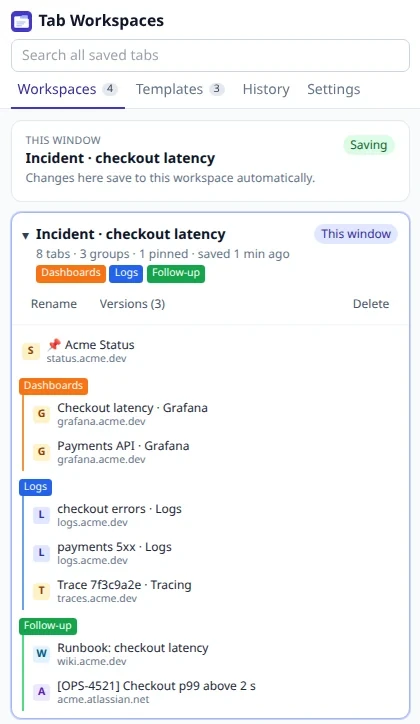
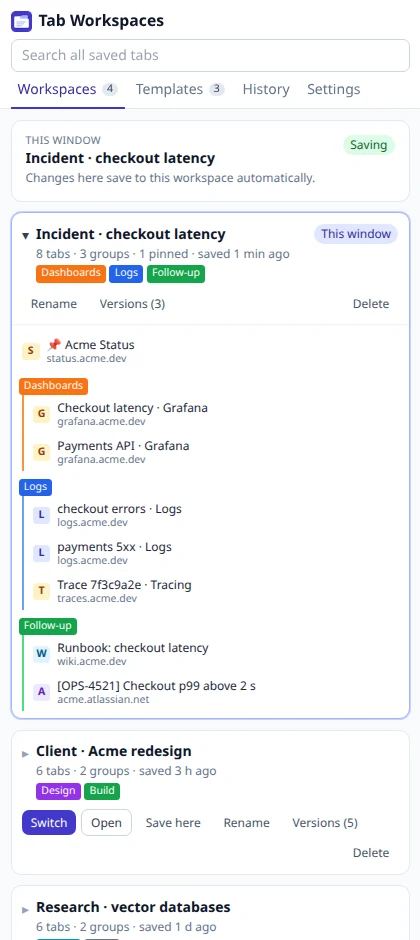
The Tab Workspaces side panel: an incident workspace with dashboard, log and follow-up tab groups

Tab WorkspacesTab workspaces that save themselvesDetails

01The lineup

Everything we make,
in one place.

Six are ready today and three more are on the way. Pick a platform, or browse them all.

Available now6

Workflow Monitor

New

For n8n agencies

  • Web app

Know before your client does.

  • Catches workflows that stop running, not just errors
  • Tests credentials and lists the workflows they would break
  • Flags n8n versions with known security advisories

Tab Workspaces

New

For your tabs

  • Chrome extension

Switch whole workspaces in one click, and never lose a tab.

  • Save a window as a workspace and switch in one click
  • Auto-save, 20 versions per workspace and a snapshot every 5 minutes
  • Tab-group templates with variables like {{requestId}}

SafeRepro

New

For bug reports

  • Chrome extension

Bug reports your security team will approve.

  • Screenshot, area capture or tab recording with narration
  • Console errors, network requests and repro steps written for you
  • Tokens, cookies, keys and card numbers redacted in the browser

Mass Email

New

For Gmail

  • Chrome extension

Personal emails to hundreds of people, from your own Gmail.

  • AI writes the email and a personal line for each person
  • Mail merge from Google Sheets, Excel, CSV or a web page
  • Checks for spam words, empty tags and a missing unsubscribe line

AskAI

On any website

AI right where you write and read.

  • Improve, fix grammar, shorten or change the tone, right in the text box
  • Explain, summarize or translate what you read, even whole pages
  • Press Alt+J on any selection to search every action or type your own

X-Reply

For X and social

  • Chrome extension

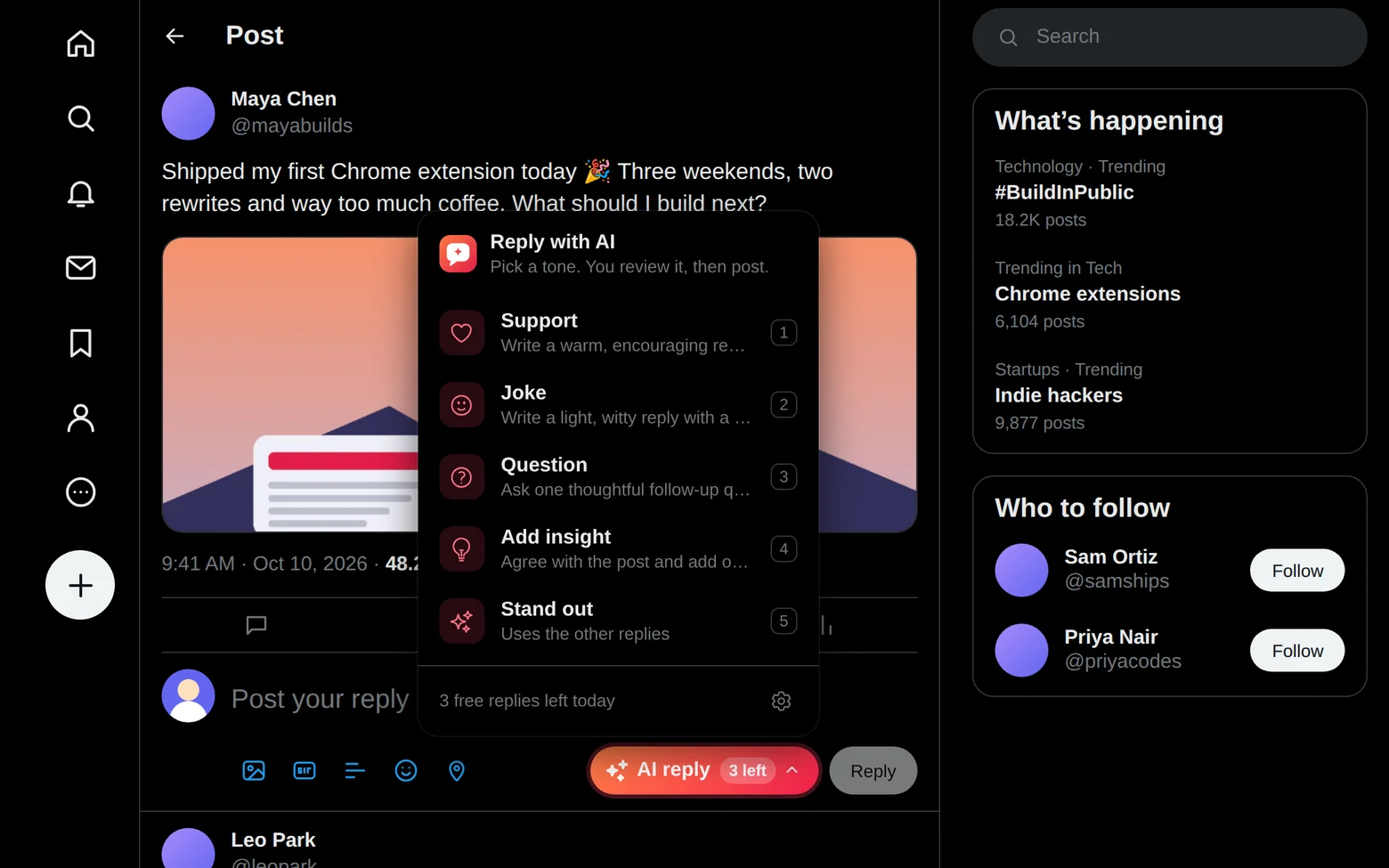
Reply on X in seconds. Still sound like you.

  • An AI reply button that fits X’s Light, Dim and Lights out themes
  • Write your own tones, or start from 11 templates
  • Never posts, likes or follows for you
Coming soon3

Money Tracker

Soon

For your budget

  • Android app

Know where every coin goes.

  • Add an expense in seconds with a calculator keypad
  • A monthly budget with a daily allowance
  • Charts by category, month and year

Note Taker

Soon

For lectures and meetings

  • Android app

Record it. Read it. In any language.

  • Records for hours, even with the screen off
  • Transcripts in 100+ languages, detected automatically
  • Summaries, decisions, action items and flashcards

Baby Tracker

Soon

For new parents

  • Android app

Feeds, sleep and diapers in one tap.

  • Breastfeeding timer with left and right sides
  • Home-screen widget and timer in the notification bar
  • Trends and WHO growth percentiles

02New · Tab Workspaces

Switch workspaces in one click, and never lose a tab again.

Tab Workspaces saves each project, client or incident as a window that keeps itself up to date, backs up every open window automatically, and opens your dashboards and logs with the request ID and time range already filled in.

  1. The Workspaces list: “Incident · checkout latency” open in this window and saving, with its Dashboards, Logs and Follow-up tab groups

    Step 1

    Save a window as a workspace

    Name it and you are done: tabs, tab groups and pinned tabs are saved, and every change in that window saves itself. Switch to another workspace in one click.

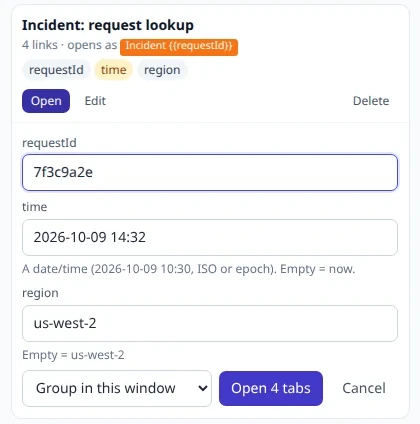
  2. The “Incident: request lookup” template asking for requestId, time and region before opening 4 tabs

    Step 2

    Open the right tools with a template

    Type the request ID and the time once. Every dashboard and log opens with the values filled in, as one named tab group.

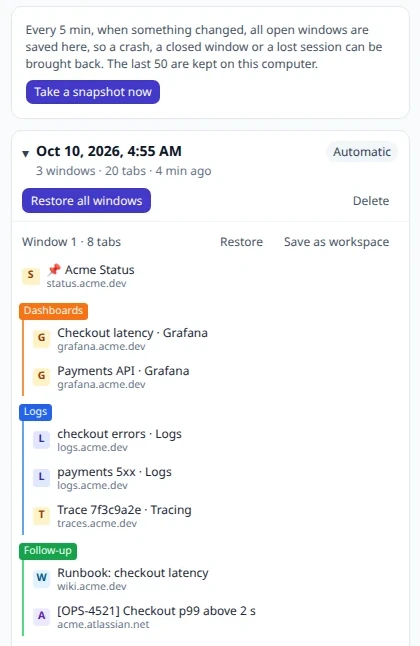
  3. History: an automatic backup of 3 windows and 20 tabs, with Restore all windows and the first window’s tab groups

    Step 3

    Get everything back after a crash

    Every 5 minutes, all your open windows are backed up to History. Restore them all, just one window, or save one as a workspace.

no account, no limits
Free
workspaces stay on your computer
0 servers
kept per workspace, so a mistake is easy to undo
20 versions
of every open window, taken every 5 minutes when tabs change
50 backups

03New · SafeRepro

Bug reports with every log attached, and none of the secrets.

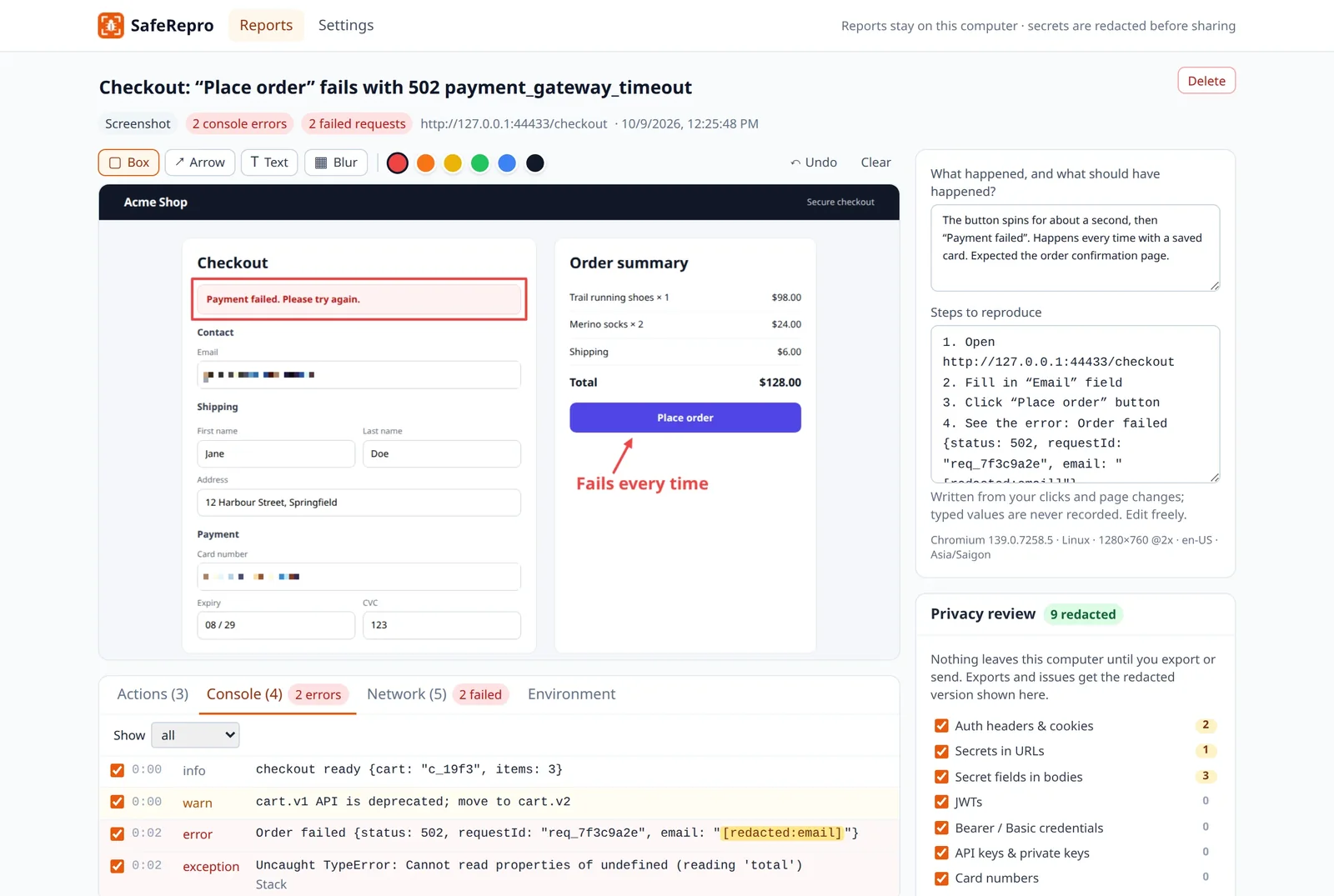
SafeRepro captures the screenshot or a recording, the console errors, the failed requests and the repro steps in one click, then redacts tokens, cookies, passwords and keys in your browser before anything is shared.

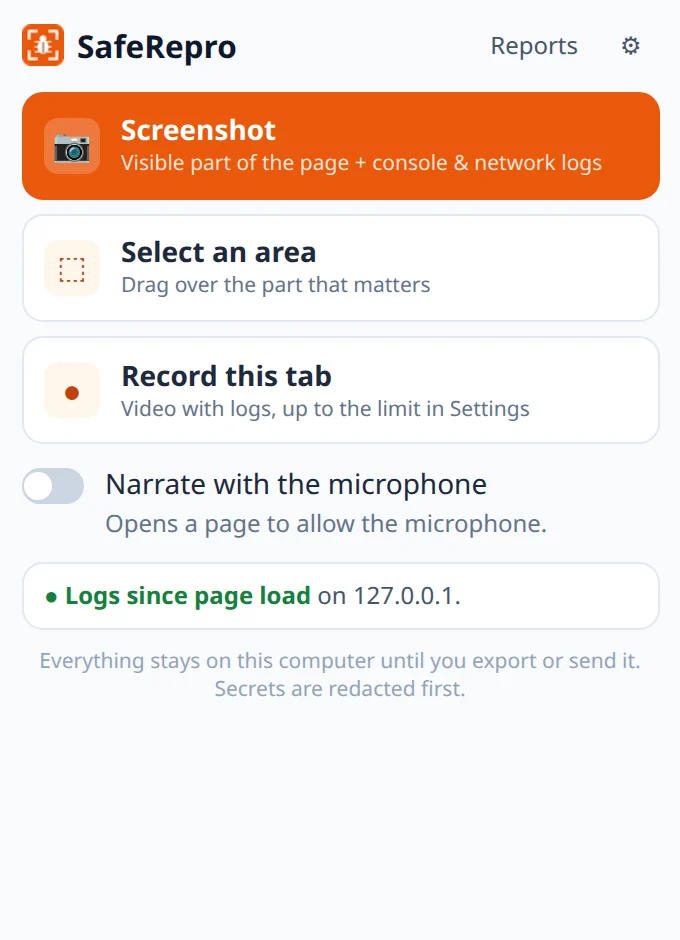
  1. The SafeRepro popup: Screenshot, Select an area and Record this tab, with logs since page load turned on for the site

    Step 1

    Click it on the page with the bug

    Take a screenshot, drag over just the part that matters, or record the tab. Console and network logs come along automatically.

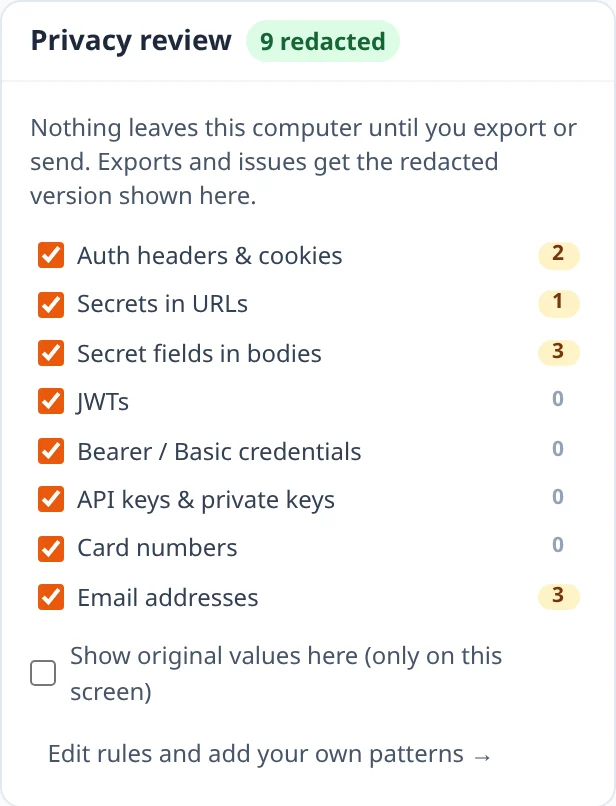
  2. The privacy review: auth headers, secrets in URLs, secret body fields and email addresses redacted, 9 in total

    Step 2

    Review what will be shared

    The privacy review lists every secret it hid, rule by rule. Switch a rule off for one report or leave a log row out before you share.

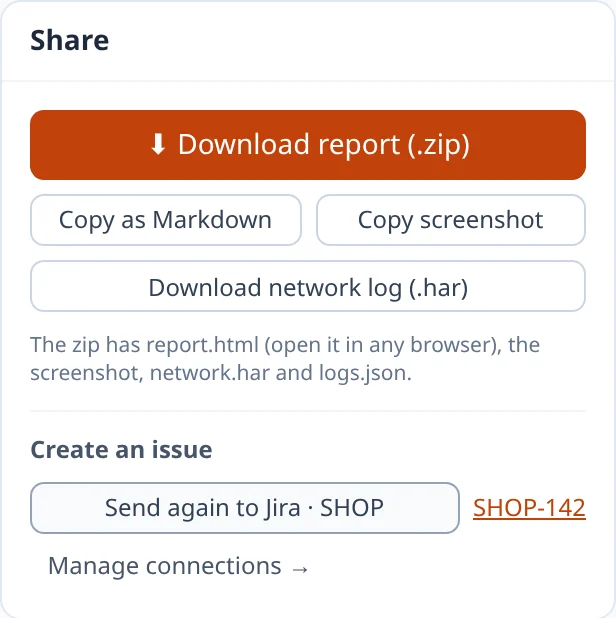
  3. The Share panel: Download report, Copy as Markdown, Copy screenshot, the network log, and an issue created in Jira

    Step 3

    Send it, or download it

    File it in Jira, GitHub or Linear with your own token, or download one zip with an HTML report any engineer can open.

permission warnings at install
0
reports stay on your computer
0 servers
tokens, cookies, passwords, keys and card numbers
Redacted
it notes which field you filled in, never the value
No keystrokes

04New · Mass Email

Mail merge that sounds like you wrote every single email.

Mass Email writes your campaign with AI, adds a personal line for each person, and sends from your own Gmail, one email at a time and under Gmail's limits.

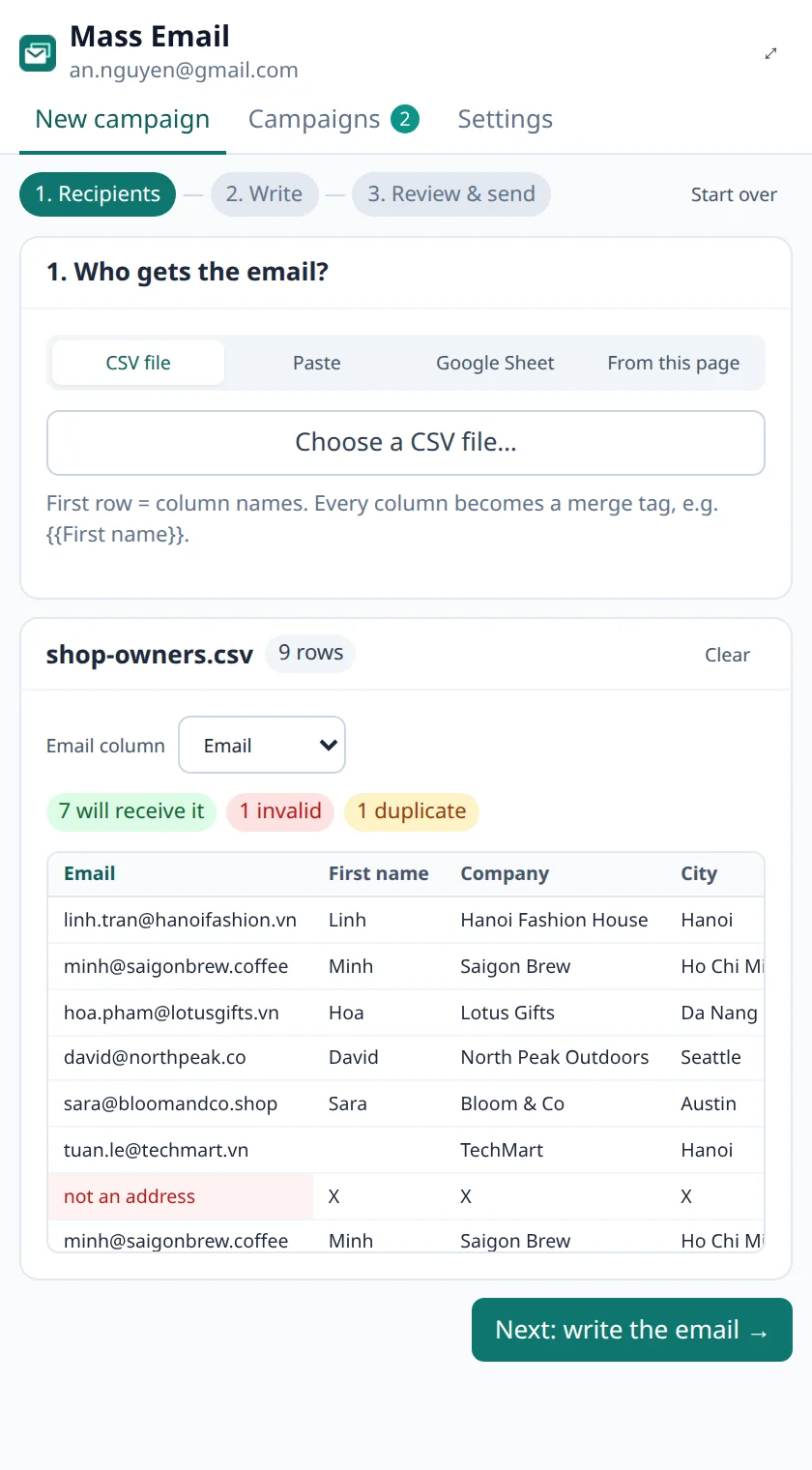
  1. The Recipients step: 7 valid addresses, 1 invalid and 1 duplicate flagged in a contact list

    Step 1

    Add your recipients

    Upload a CSV, paste rows from Google Sheets or import a Sheet link. Invalid, duplicate and unsubscribed addresses are dropped for you.

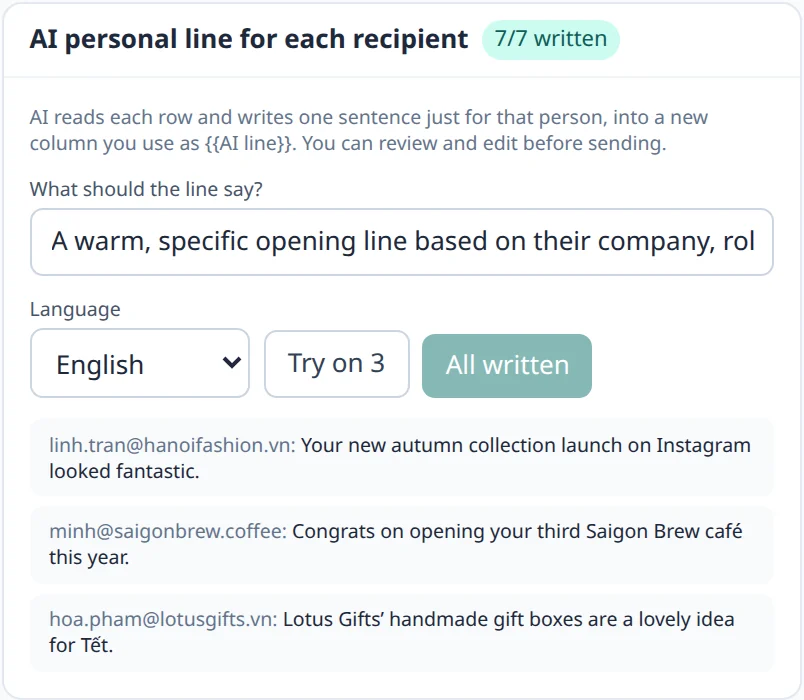
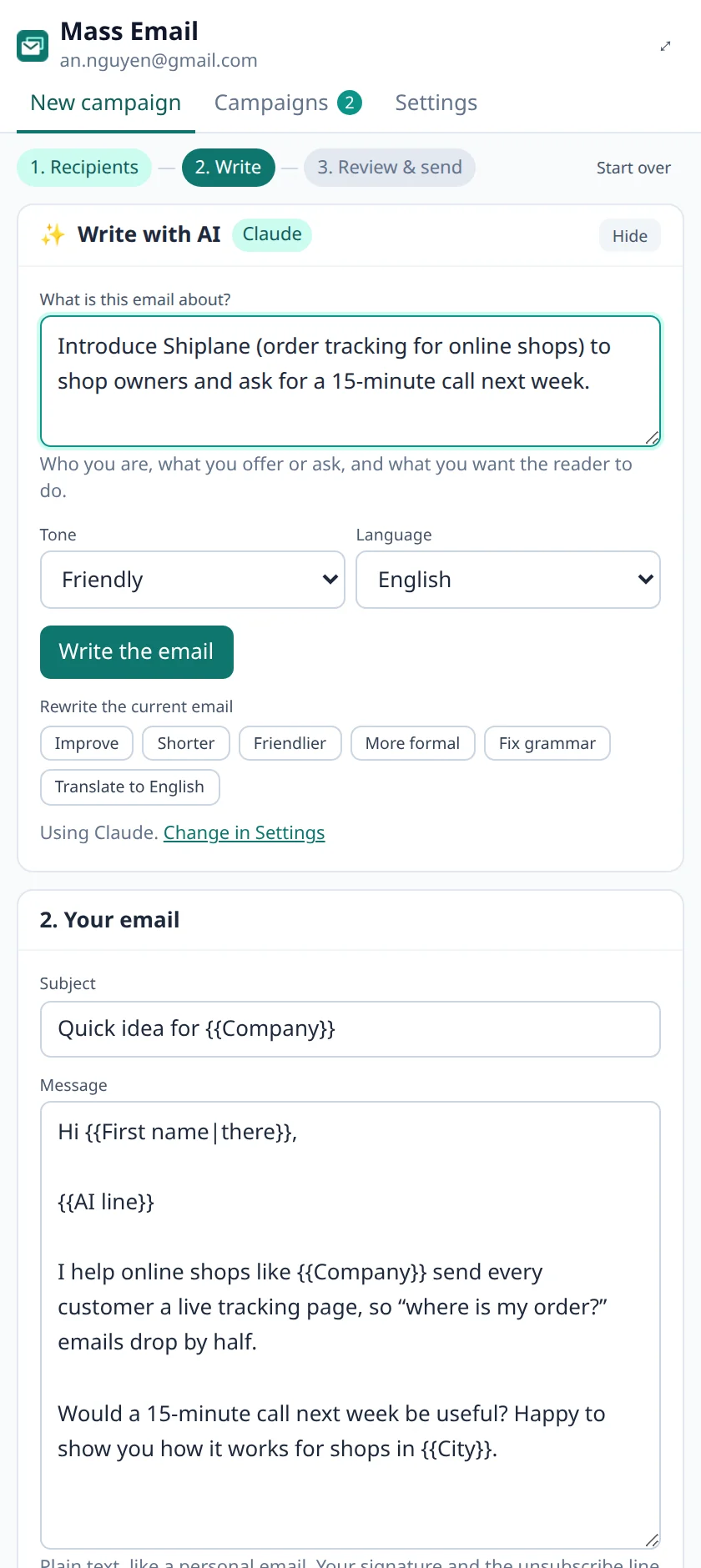
  2. AI personal lines written for three recipients from their company and city

    Step 2

    Write it with AI

    AI drafts the email from a one-line brief, then writes one personal line for each person from their row. You review every line.

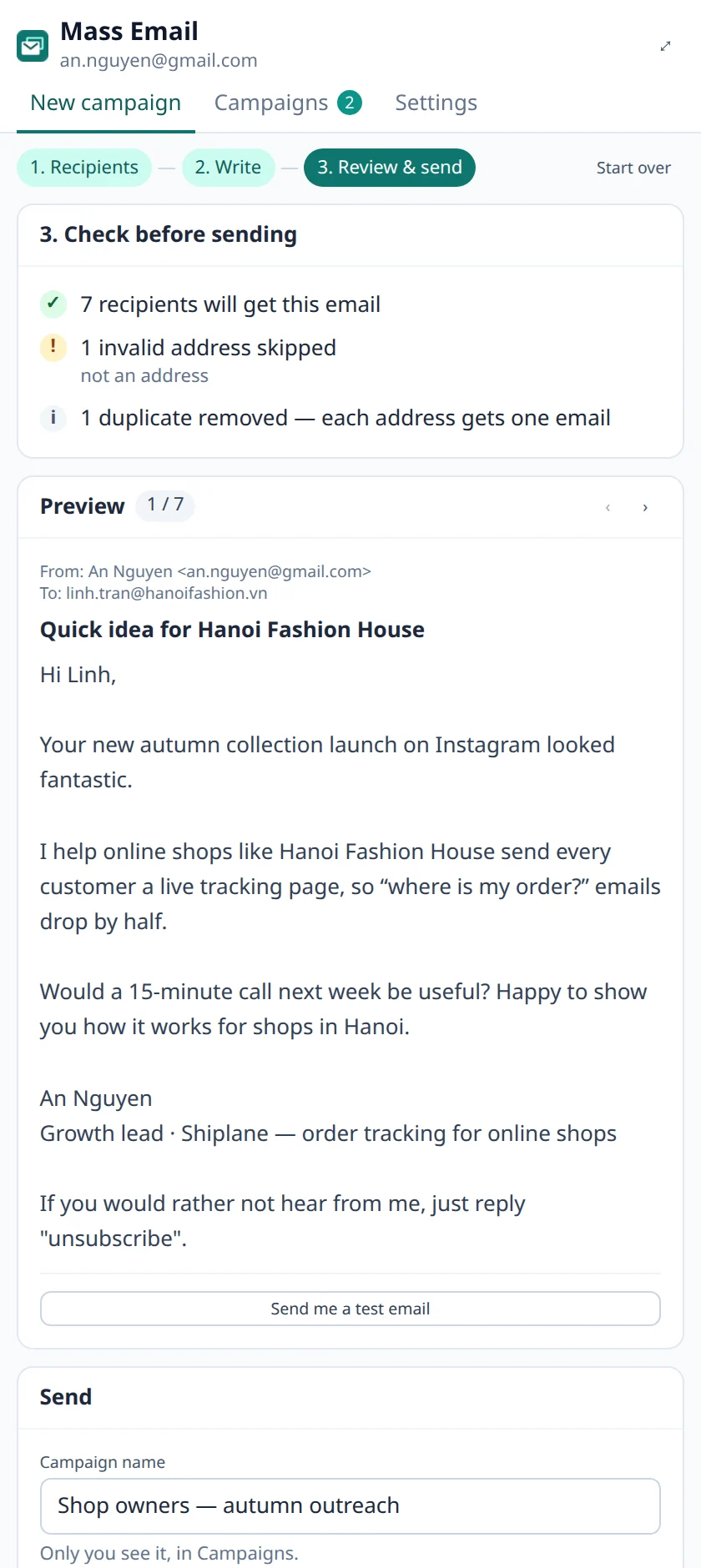
  3. The Review step: checks passed and a personalized preview for Linh at Hanoi Fashion House

    Step 3

    Check, test and send

    Read each email exactly as it will arrive, send yourself a test, then start now or schedule it. Sending continues with the panel closed.

random pause between emails
8–20 s
safe Gmail limit (1,500 on Workspace)
400 / day
lists and drafts stay in your browser
0 servers
Gmail access: it can't read your inbox
Send-only

05Redesigned · Chrome extension

AskAI. AI right where you write and read.

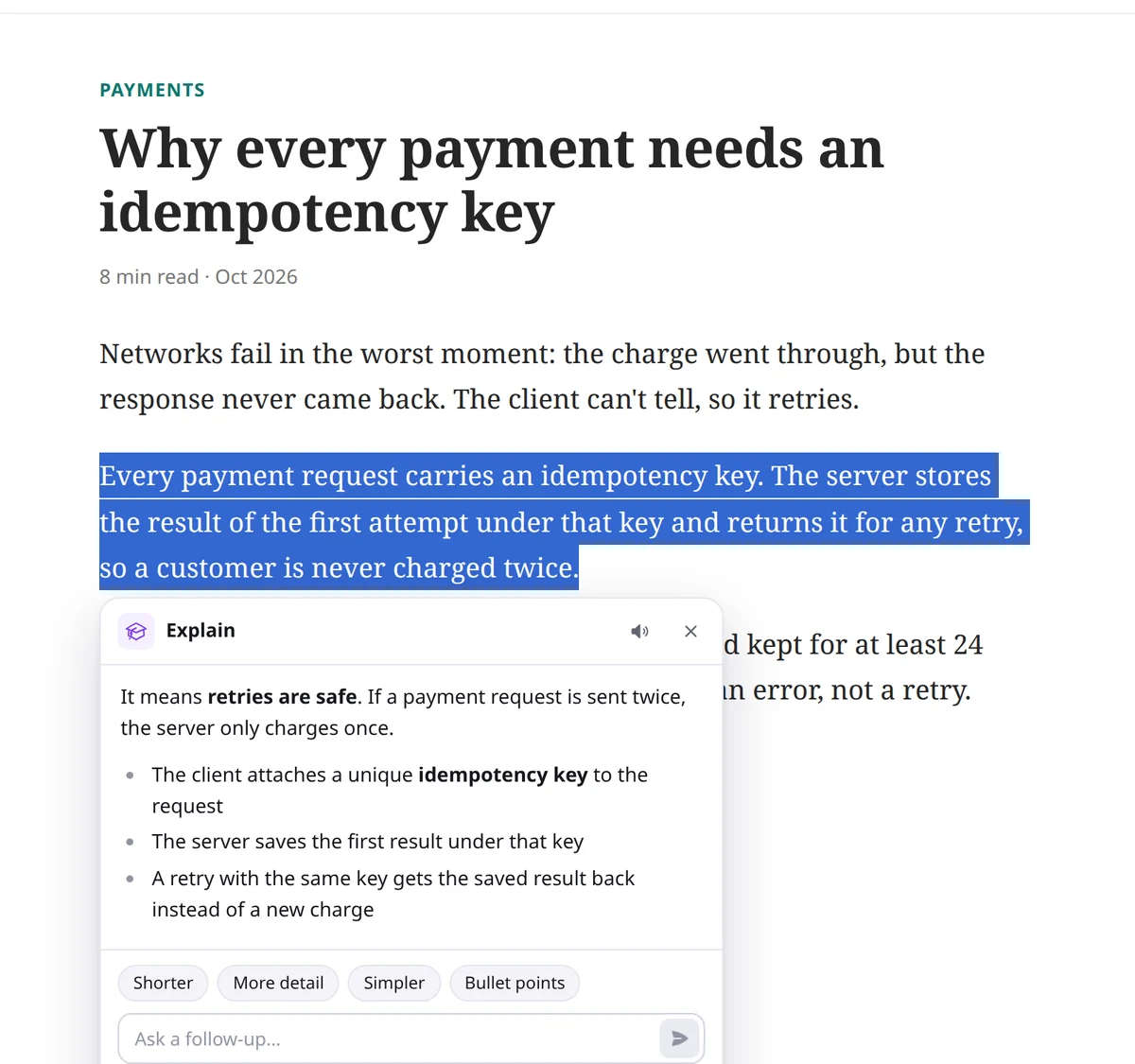
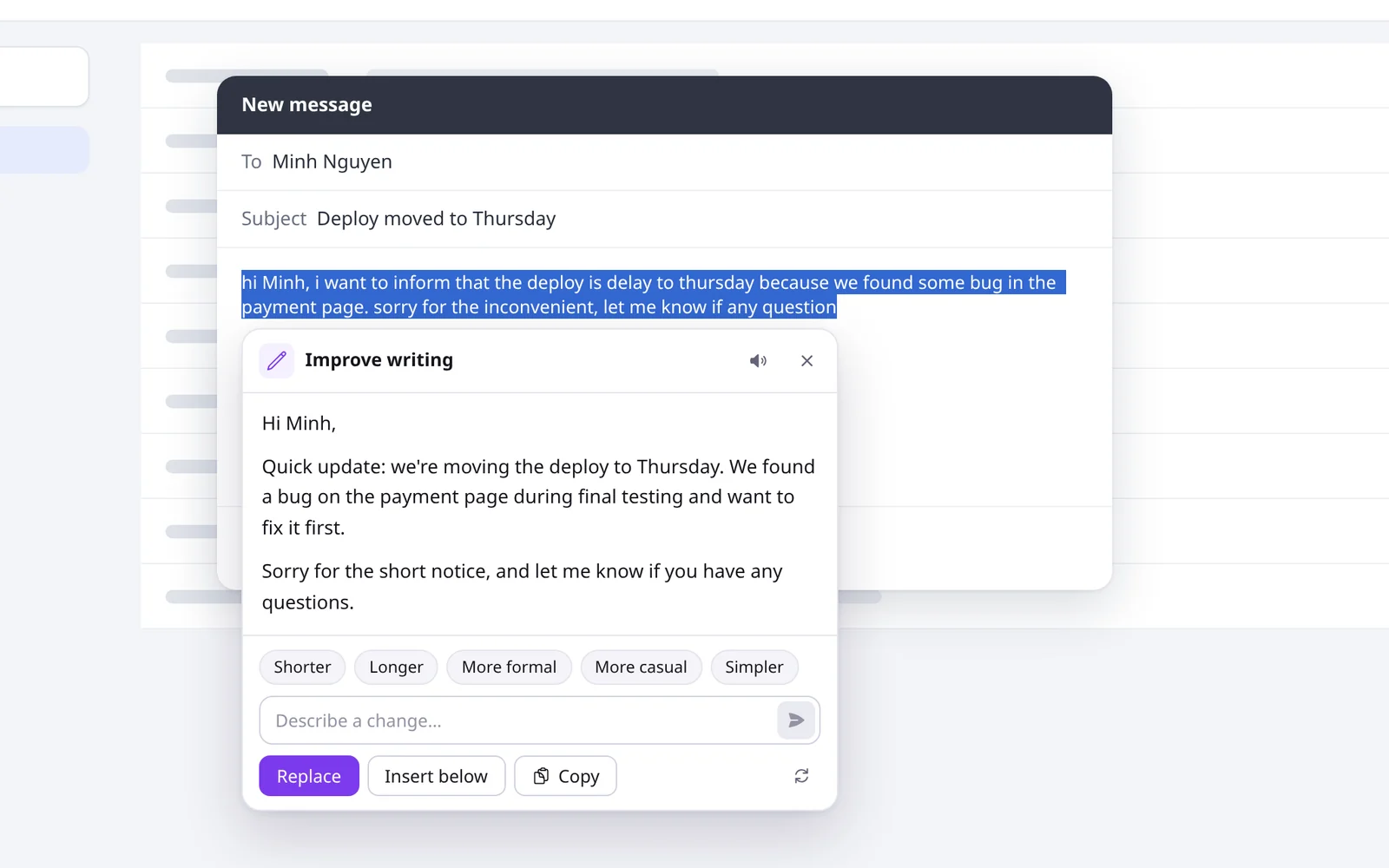
Select text on any website and AskAI rewrites it, fixes the grammar, translates it or explains it, then puts the result back in the text box. No copying between tabs, and Undo is one click away.

  • Improve, fix grammar, shorten or change the tone, right in the text box
  • Explain, summarize or translate what you read, even whole pages
  • Press Alt+J on any selection to search every action or type your own
  • Ask about part of the screen, or chat in the side panel
  • Hide it on any site, and it never shows in password fields
  • Free daily AI tokens, or bring your own API key
any website
AskAI explaining a selected paragraph of an article in plain words, with follow-up options

06On your phone · Android

Money Tracker. Know where every coin goes.

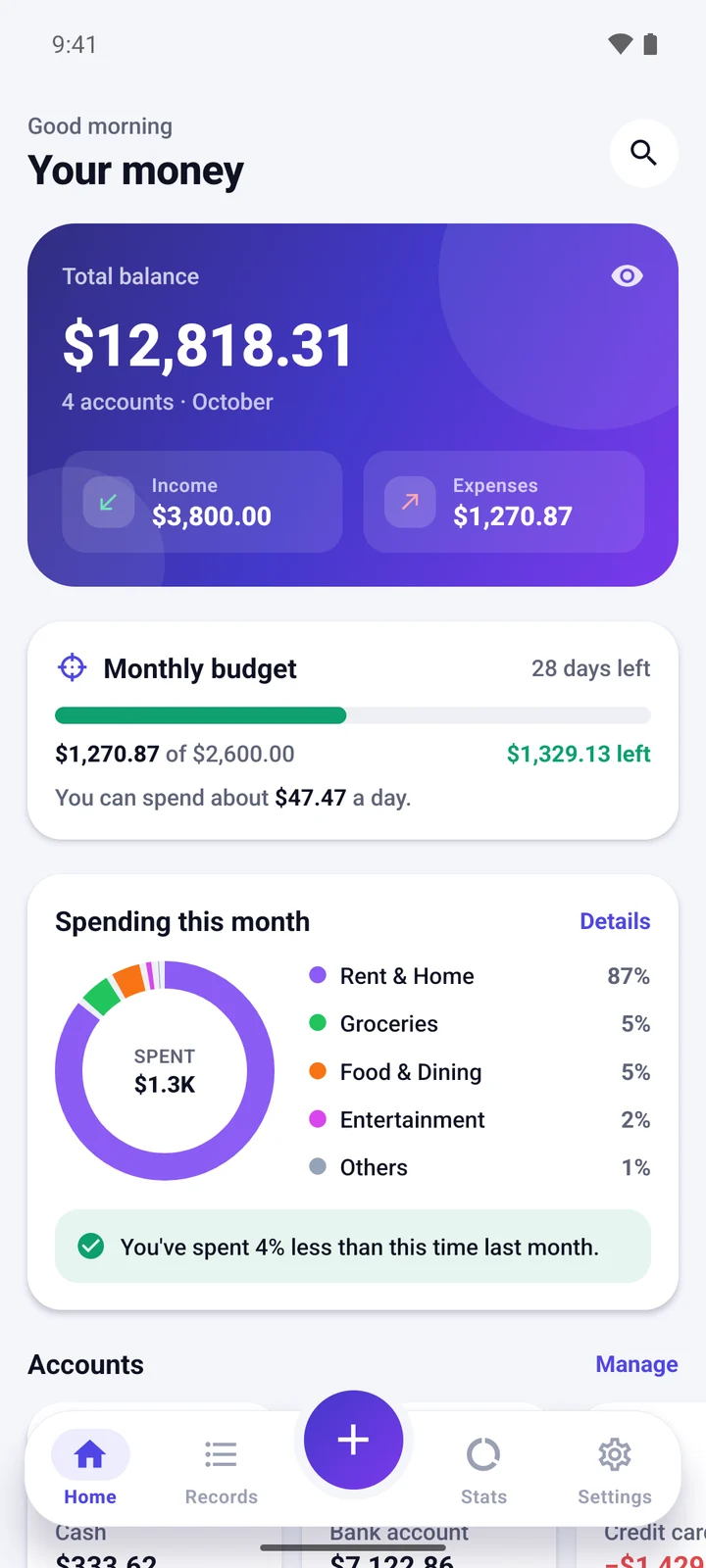
Log spending in seconds, see clear charts and stay on budget. No account, no ads, and your data never leaves your phone.

  • Add an expense in seconds with a calculator keypad
  • A monthly budget with a daily allowance
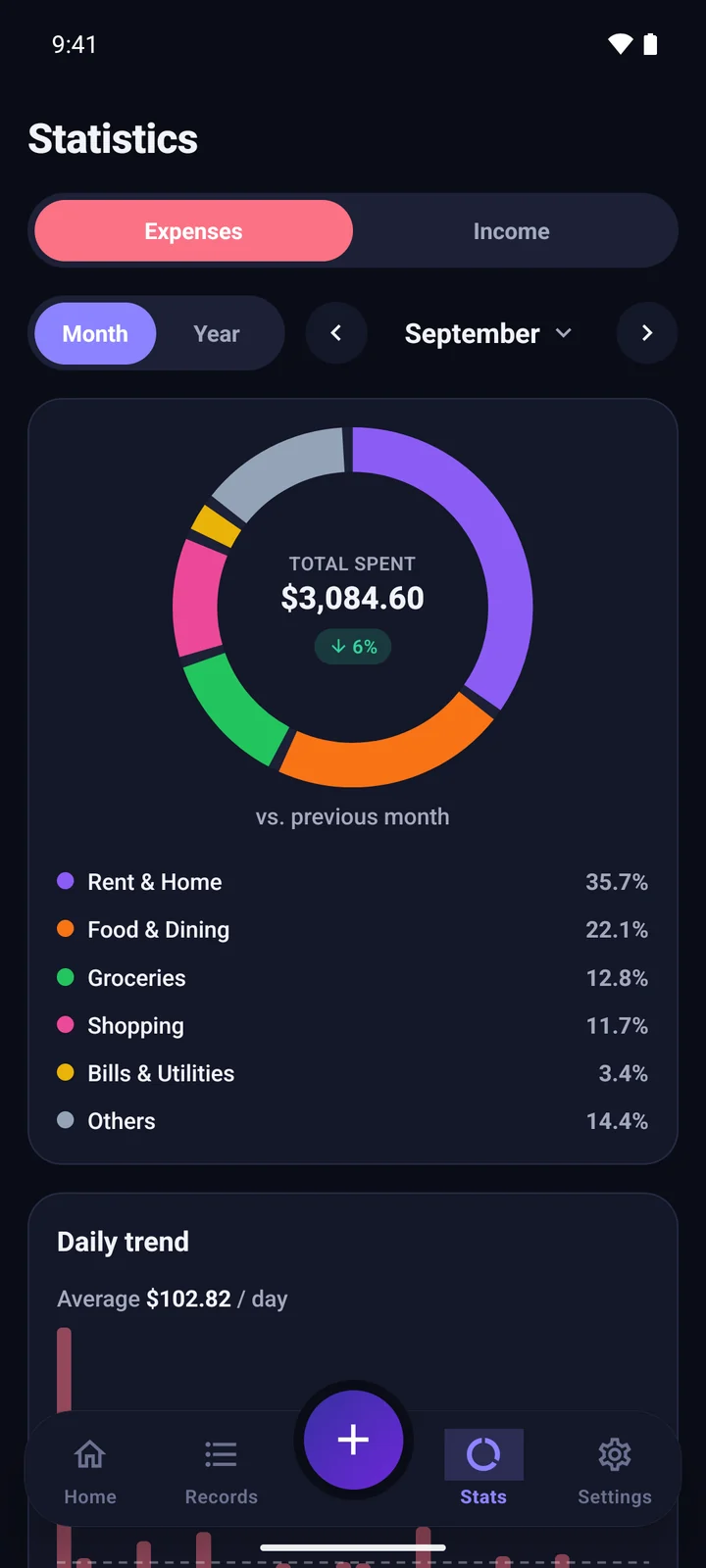
  • Charts by category, month and year
  • 12 currencies, dark mode, CSV export and backups
Coming soon · Learn moreSoon on Google Play
Money Tracker home: total balance, monthly budget and spending by category
Money Tracker stats in dark mode: a spending donut and category ranking

07How we build

Small tools, strict rules.

01

It lives where you work

In Chrome, on your phone or in a browser tab: each app shows up where the job already happens, so there is nothing new to learn.

02

Private by default

Most of our apps keep your data on your computer or phone, with no account and no server. Each app's privacy policy says exactly what it stores.

03

AI where it helps

Bring your own key for GPT, Gemini, Claude, DeepSeek or Grok, or use Chrome's free on-device AI. Apps that don't need AI don't have it.

04

Free to start

Every app is free to install or try, so you can test it on your own work first. Some offer paid plans for heavy use.

08FAQ

Questions, answered.

These cover every app. Each app's own website has a longer FAQ about that app.

Do I need an account?

Not on this site. Extensions and phone apps install from their stores and keep their settings on your device. Web apps, and some optional features such as the built-in AI service in AskAI, may ask you to sign in.

Which browsers and phones are supported?

Chrome extensions work in Google Chrome and other Chromium browsers that install from the Chrome Web Store, such as Microsoft Edge and Brave. Android apps come from Google Play, and web apps run in any modern browser.

Where is my data stored?

Extensions and phone apps keep your data on your device, and many have no server at all. When you use an AI feature, the text you send goes to that AI provider. Each app's privacy policy, linked from its website, says exactly what it stores.

Are the apps free?

Every app is free to install or try. Some offer optional paid plans for heavier use; each app's website has the details.

Some apps say "Coming soon". When do they launch?

Their store listings aren't public yet. Each app's website shows when it launches, and some let you ask to be told.

How do I get help with an app?

Each app's website has its own FAQ and a way to reach us. You'll find the link on its card above.