Quick Start
Learn the basics of using Dialogix in under 5 minutes.
Your First AI Action
Step 1: Select Text
Navigate to any webpage and highlight some text. Try selecting a paragraph from a news article or a sentence you'd like to improve.
Step 2: Use the Popup
When you select text, a small Dialogix popup appears near your selection. This popup shows your most-used actions.
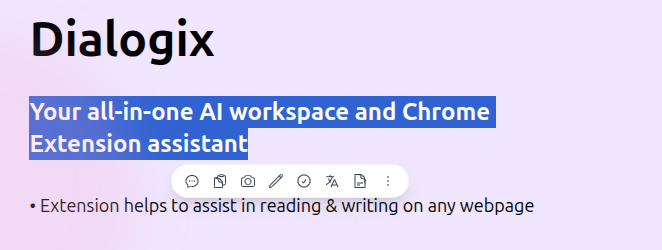
Step 3: Choose an Action
Click on an action like:
- Improve Writing — Enhance clarity and flow
- Fix Grammar — Correct spelling and grammar mistakes
- Translate — Convert to another language
- Summarize — Get the key points
Step 4: View Results
A response modal appears with the AI-generated result. You can:
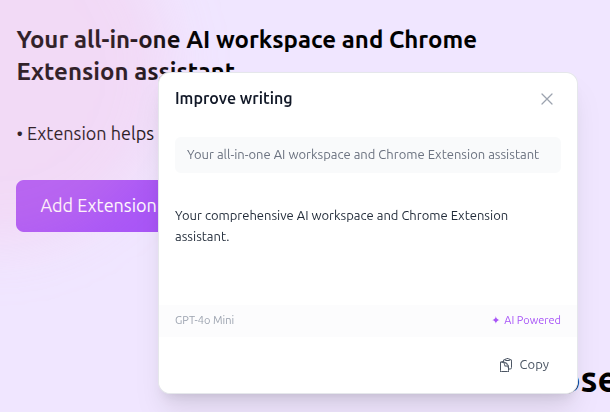
- Copy the result to your clipboard
- Close and try another action
Common Use Cases
Writing Improvement
Before: "The meeting was good and we talked about stuff"
After (Improve Writing): "The meeting was productive, covering key strategic initiatives and action items for the upcoming quarter."
Translation
Select text in any language and use Translate to convert it to your preferred language. Dialogix supports 30+ languages including:
- European: Spanish, French, German, Italian, Portuguese
- Asian: Chinese, Japanese, Korean, Vietnamese, Thai
- Middle Eastern: Arabic, Hebrew, Turkish
- And many more...
Summarization
Perfect for:
- Long articles you want to skim
- Meeting notes you need to condense
- Research papers you want to digest quickly
Next Steps
- Explore all Features
- Configure your API Keys for unlimited usage
- Create Custom Prompts for your specific needs